
Authors
Jessica J. Cringan, CHSOS1, Afrah A. Ali, MBBS, FAAEM1, Rebecca M. Gilbird, MPH, CHSOS-A, CHSE1
1Brody School of Medicine, East Carolina University, Greenville, NC
Conflict of Interest Statement
The authors of this manuscript have no conflicts of interest to report.
Corresponding Author
Jessica J. Cringan, CHSOS, Brody School of Medicine, East Carolina University, Greenville, NC (Email: cringanj15@ecu.edu)
Brief Description
The simulation center operations depend on the efficiency of maintaining a robust inventory. An inventory management system is helpful in tracking the available resources at regular intervals. The Glide app provides a low-cost solution for simulation centers. Glide is an AI generator app and does not require any knowledge of computer coding. It helps create a customizable inventory, where data can be easily uploaded and accessed by multiple users. This article describes in depth how to set up an inventory management system using this app.
Introduction
Simulation Centers are designed based on the institution's needs assessment for the learners (Kumar et al., 2024). The design of a simulation lab varies based on available area, with storage capacity serving as an important considering during the planning phase (Baily, 2019; Baily, 2020). A standard to consider for storage is 10% to 25% of net assignable square feet (McCarthy et al., 2022). The storage space should accommodate all the equipment required for the different educational experiences. In order to operate efficiently, simulation centers would benefit from maintaining an inventory of all equipment. This includes assets such as high fidelity manikins, ultrasound machines, task trainers, computers, consumables such as disposable medical equipment, and non-consumables such as materials for moulage (Gore, 2024). However, maintaining an accurate inventory of all available equipment can be difficult (Kumar et al., 2024).
Inventory management systems have been offered by the industry to streamline efficiency in simulation centers (Nagle et al., 2018). They are considered an important part of efforts to manage a simulation center’s inventory. Primarily, two types of systems are available, the push and pull systems. The push inventory system is frequently utilized for forecasting the demands of the supplies. This approach involves reviewing trends in previously used quantities and purchasing future supplies based on projected demand. For instance, for a simulation activity which requires intravenous (IV) lines, the quantity purchased would be based on what the simulation center forecasts the activity will need. In contrast, the pull inventory system focuses on the real-time demands of the supplies. This involves stocking items based on requests for scheduled simulation activity. For instance, for a simulation activity which requests a total of 25 IVs, specifically ten 18 gauge, ten 21 gauge IV, and five 22 gauge IV. This would be ordered after receiving the request from the simulation activity’s course director (Glesmann, 2024). The initial set up and maintenance cost of industry management systems vary in cost from $500 to $10,000 depending on the package needed for the simulation center (Herrington, 2020). Free trial versions of the software have limitations on the available functions. Detailed and diverse reviews are often difficult to locate, leaving vendor-provided information as the primary source, which may lack objectivity. These limitations lead simulation centers to seek customizable options for their inventory needs.
Innovative, sustainable, and affordable inventory management is essential for meeting the demands of the operations of a simulation center. This article will elaborate on how to maintain an inventory for the simulation centers equipment and supplies. In addition, we will discuss the challenges, development and implementation of an inventory management system at our simulation center. This is a novel method using cost-effective resources that can be customized for any simulation center.
Simulation Center Details
Brody School of Medicine (BSOM) Interprofessional Clinical Simulation Program is a 10,000 square foot space that offers simulation-based medical educational experiences to a wide variety of learners. It has 21 rooms, including an on-site supply room, a 720 square foot storage room in the school basement, a mobile unit, and an off-site Osprey trainer. The program serves medical, physician assistant, dental, and nursing students, graduate medical residents and fellows, local community colleges, the military, critical care flight teams, and various other groups. In fiscal year 2021, the program had 6,021 learner contact hours. In fiscal year 2025, we had over 18,000 learner contact hours. This rapid expansion had led to the need of additional equipment. During this same period, the simulation program received over $1.5 million USD in funding for equipment. Additionally, the Center’s budget increased over $120,000 annually to meet demand. This rapid expansion prompted the BSOM Simulation Center to seek novel ways to track and inventory the equipment and supply needs for its expanding program.
Challenges
The initial solution was an investment in an inventory management product. In 2018, the simulation center purchased an industry product to track inventory which cost of $8,225.10. This purchase included software, a laptop, barcode scanners, labeling system, and 2-hour training from the vendor. During the selection process, the online backup system was a key priority for ensuring data protection. However, implementation revealed significant challenges. The inventory input process proved not only time-consuming but also inflexible to our specific requirements, requiring months of dedicated effort to transfer data into the system. After several months of entering data, the system crashed. Despite having prioritized the online backup feature, the vendor was unable to access it, resulting in complete data loss.
After the vendor-management system failed, we next sought to use the same inventory system used by our university for purchasing. However, this system proved to be slow in processing each step, making data entry cumbersome. Additionally, there were predetermined data fields which did not align with our center’s needs. There was significant difficulty searching for items, as it involved multiple sign-ins to access, timed out after several minutes, and required very specific search terminology or item number. Our team quickly pivoted from this system, recognizing the enormous time cost to personnel.
The next approach to finding an inventory management system was to create a personalized system for the center. The information technology department at BSOM was contacted to help with this task but was unable to help due to time constraints. Another strategy discussed was to input all inventory into a Microsoft Excel (Version 2502) document. The simulation technician began entering all data in Microsoft Excel, continuously refining the spreadsheet to include serial numbers, room and shelf locations, and quantities. This process was tedious and unpopular with faculty and staff. The team found using Excel sheet had significant limitations. The file was housed on the shared department drive, limiting access to only one team member at a time. It was also difficult to search for items and identify duplicate entries due to the multiple tabs, lengthy spreadsheets, and variation in naming conventions. Additionally, the format was not compatible with use on a mobile device. There was also a risk of accidental errors or deletions since all team members had editing access.
One of our simulation technicians attempted to create an app using Python and Javascript. However, this process required significant time and knowledge about using these applications.
Finding and maintaining an inventory system was difficult for our simulation center as we have multiple storage areas. The simulation center utilizes a supply room for frequently used equipment, a basement storage area for less frequently used equipment, and an offsite storage area for the Osprey trainer. Because staff cannot monitor all areas simultaneously, equipment could get moved without their knowledge, making items difficult to locate when needed. In addition, our center serves a variety of specialties, each with unique equipment needs. Given these constraints and the lessons learned from previous attempts, we recognized the need to develop a customized solution that could adapt to our center's specific requirements.
Development of the Inventory Management System
Extensive research regarding available products identified the Glide app (No Code App Builder, n.d.). The Glide app is an artificial intelligence program that helps users to make an application without prior knowledge of coding. On reviewing its features, we were able to accomplish our goal using the free basic version. However, there is an option to access advance features with an annual charge.
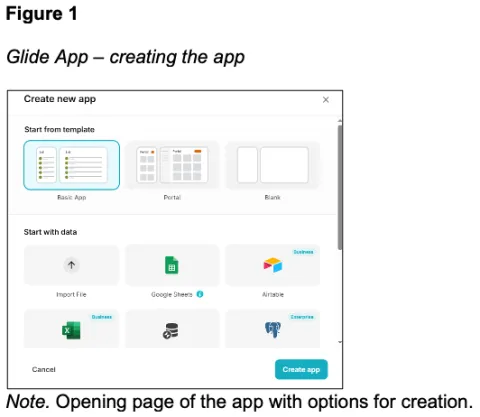
To start, an account needs to be created on the Glide App website (www.glideapps.com) (Figure 1). Once an account has been established, the next step is to identify what data to upload and determine how to label equipment and supplies. The terminology used for search features must align with the language users naturally employ. For instance, to locate the high-fidelity pediatric manikin, Sim Junio, users could search using descriptive terms such as “pediatric”, “Hi fi”, or “manikin.” An advantage of the app is its ability to customize and update equipment labels in real time.
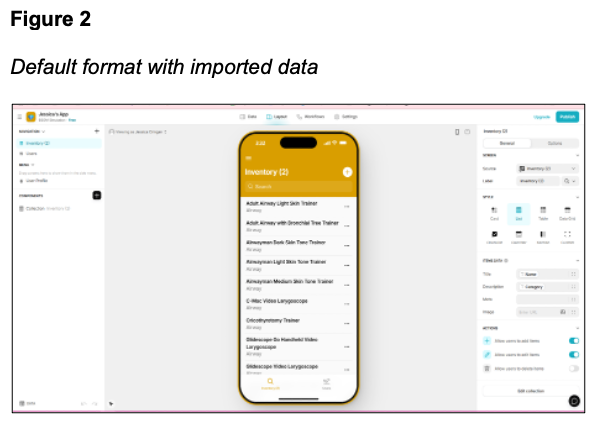
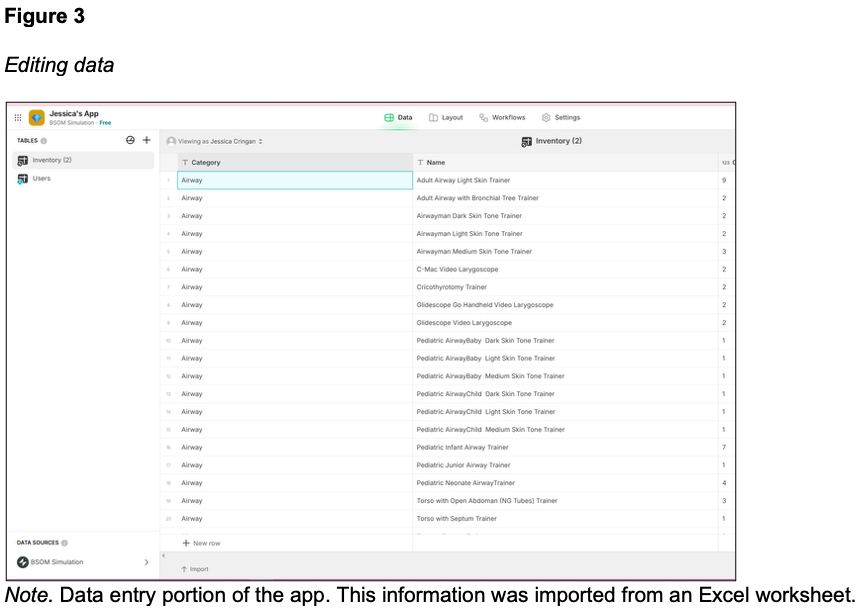
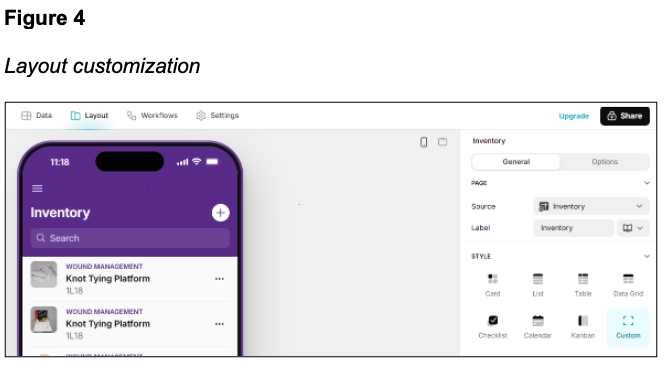
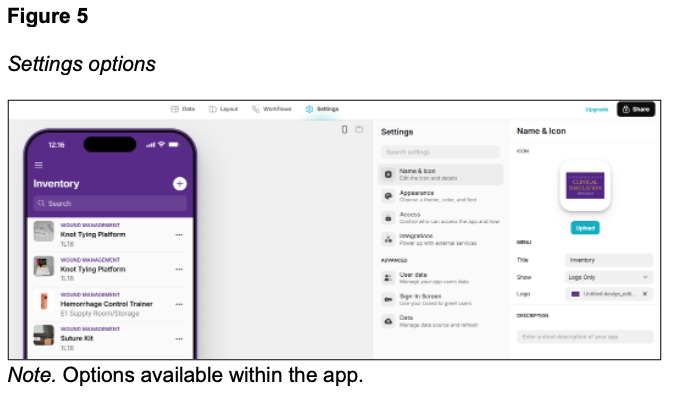
This data is then entered into a Microsoft Excel (version 2502) sheet or google sheet, which can be directly imported into the program. This is then converted into the default format for the app (Figure 2). Once created, all data can be edited by clicking on the individual items (Figure 3). The layout of the app can be personalized by selecting the available options for format under the “layout” section (Figure 4). Under the “General” tab, the options for “Label” can be customized to fit the individual items. The “Items Data” section allows users to select the display of the information. The available options for the individual items are, “Title”, for the item label, “Description”, for the item location, and “Meta”, for the item category (Figure 5). All data for these can be interchanged depending on the preference of the display of the information.
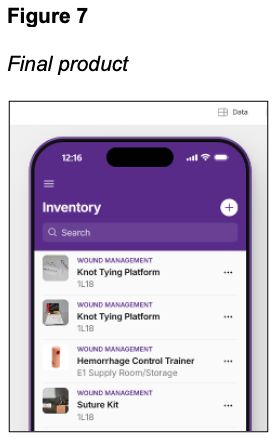
The “Show Search Bar” option can be customized to the user’s preference. Making this easily accessible is crucial for ensuring a user-friendly experience. Utilizing the “Settings” tab, the appearance and user access can be edited (Figure 6). Following these instructions will help create a customizable inventory for the simulation center (Figure 7). The learning curve to operate the program is minimal, making it easy for individuals to start up quickly. The website also has videos to help with creating an app.
The time required to create the app varies by individual. The simulation technician at BSOM has a degree in an Information technology related field, an emergency medical technician, and ten years of experience in the field of simulation. The initial development of the Microsoft excel sheet for the Glide App did take considerable time. Once uploaded into the program, it took about 4 hours to create the app and test it. The overall time in creating this app was significantly less when compared to other inventory systems.
Implementation of the Inventory Management System
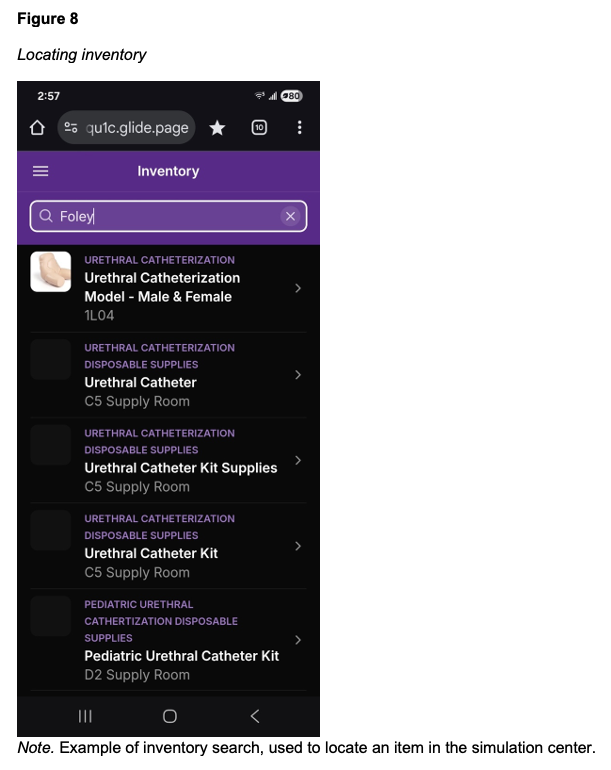
Once the app was developed, the senior simulation staff were given access to edit the data and test the app. This group consisted of individuals with and without clinical experience, technical experts, and administrative experts. Everyone was familiar with the planning process and commonly used equipment. They were able to successfully search for equipment using different terms (item brand name, procedural skill, or discipline) on both their laptops and mobile devices. For example, searching for a urethral catheterization model can be found by entering the words “Foley”, “urethral”, or catheterization”. These search results also populate related items such as urethral catheter kit supplies on shelf C5 of the supply room and male, female and pediatric models in room 1L04 and shelf D2 of the supply room. The app also includes a picture of the item, to assist someone who isn’t familiar with its appearance (Figure 8). Additionally, the app searches as the word is being typed, which is helpful if unsure of the entire procedural skill name.
When planning sessions with faculty, it assists in identifying how many of the requested skill trainers are currently available. Any staff member can easily look up the number within the mobile phone app without having to search an Excel sheet or find a simulation technician who may or may not know the answer immediately. Another advantage of using the Glide interface is the user can quickly identify duplicate entries for the same product, since it will appear twice on the screen. When this occurs, the simulation technician can easily update the raw data spreadsheet and re-upload the correct data into the app.
Considerations
Each institution has their own rules regarding development and implementation of an AI tool for educational and operational benefits. Our institute is supportive of using AI-based apps for operations programs. We recommend each program review the guidelines and best practice standards for utilizing AI generated app at your local institute.
Conclusion
Glide app is an effective solution for inventory management in a simulation center. It is a user-friendly app which can be created by individuals without any prior knowledge of coding. Data can be customized and easily accessed by multiple users.
References
Baily, K. (2019, August 20). 9 Key Considerations When Designing a Sim Lab |
HealthySimulation.com. https://www.healthysimulation.com/designing-sim-lab/
Baily, L. (2020, June 16). Healthcare Simulation Center Design: Lessons From Leading
Technical Experts | HealthySimulation.com.
https://www.healthysimulation.com/healthcare-simulation-center-design/
Glesmann, C. (2024, July 1). Understanding the Push Vs. Pull System | StockIQ.
https://stockiqtech.com/blog/push-vs-pull-system/
Gore, T. (2024, December 11). Best Practices and Tips for Inventory Management for Clinical
Simulation Centers | HealthySimulation.com.
https://www.healthysimulation.com/simulation-center-inventory-management-best-
practices-elevate-healthcare/
Herrington, A. (2020, April 24). Simulation Center Finances: Calculating Fees and Costs.
https://www.wolterskluwer.com/en/expert-insights/simulation-center-finances-calculating-
fees-and-costs
Kumar, E. S., Parameswari, A., Manickam, A., & Purva, M. (2024). Establishment of a
simulation centre: Challenges and solutions. Indian Journal of Anaesthesia, 68(1), 45.
https://doi.org/10.4103/ija.ija_1232_23
McCarthy, J., Bryant, K. D., & Maxworthy, J. C. (2022). Building a Simulation Center: Key
Design Strategies and Considerations. In Defining Excellence in Simulation Programs
(Second Edition, pp. 1037–1078). Wolters Kluwer Health.
http://ebookcentral.proquest.com/lib/eastcarolina/detail.action?docID=30777169
Nagle, A., Fisher, S., Frazier, S., & McComb, S. (2018). Streamlining a Simulation Center’s
Inventory Management. Clinical Simulation in Nursing, 18, 1–5.
https://doi.org/10.1016/j.ecns.2018.01.001
No Code App Builder: Create Custom, AI-Powered Apps | Glide. (n.d.). Retrieved October 24,
2025, from https://www.glideapps.com/